
Create Telegram Stickers: Make Your Own Stickers and Emojis in Under 5 Minutes
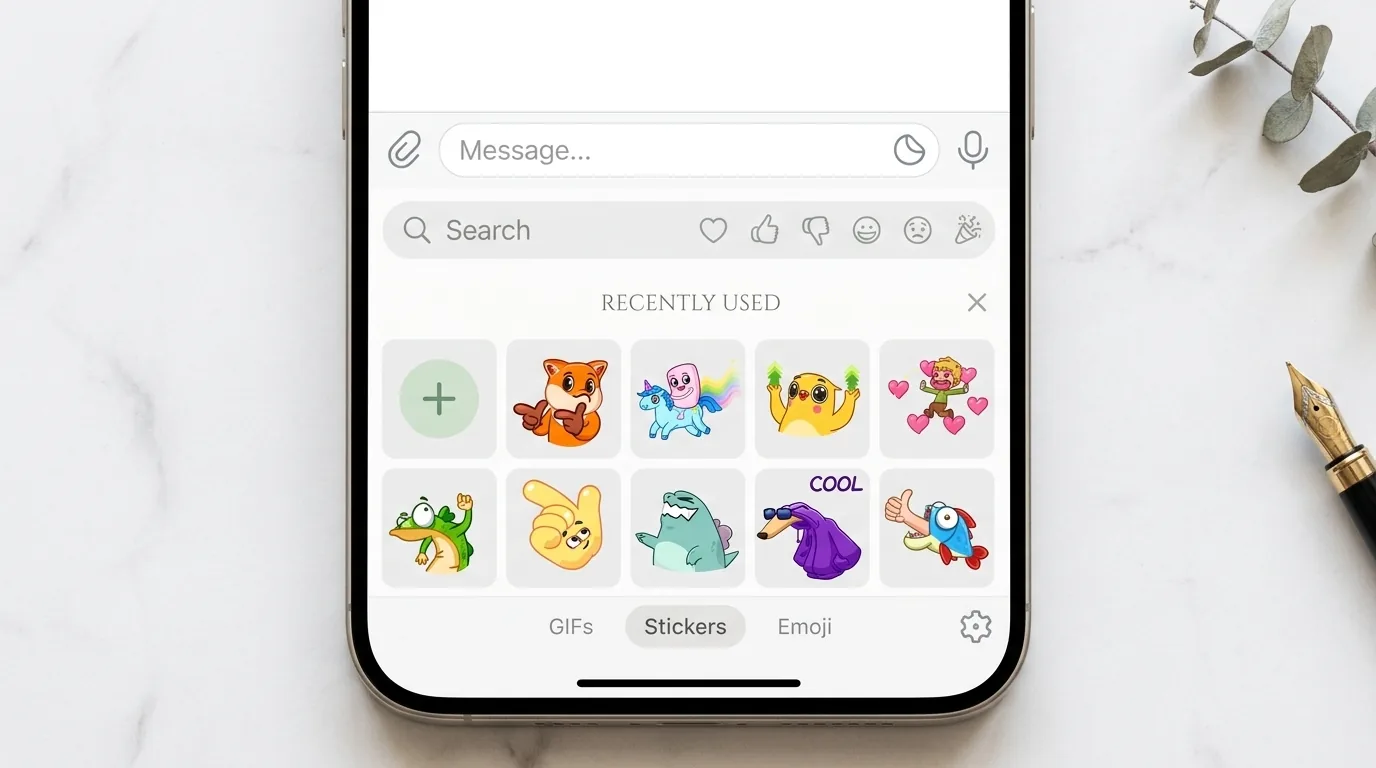
Admit it: few things say as much in a chat as a good sticker sent at just the right moment. A face, a gesture, a phrase with a style of its own... and the whole conversation shifts its tone. The good news is that creating Telegram stickers is not a job for designers or tech gurus: you can have your first pack ready to share in under five minutes, straight from your phone and without spending a cent.Telegram gives you an official, free tool to pull it off, the @Stickers bot, and in this guide we're going to use it step by step. You'll learn how to build your own sticker packs, assign an emoji to each image, name your collection and get a link to share it with whoever you want. We'll also cover how to make stickers from photos by cutting out the background, how video stickers work and what custom emojis are.And it's not all about looks. If you run a community or a channel, your custom Telegram stickers become a signature that people recognize, reuse and share for you. Every time someone sends one of your stickers in another group, your brand travels for free. Let's get to it.
Why stickers are so addictive and become your community's signature
Stickers work because they communicate emotion at a glance. Text can sound cold or ambiguous; a sticker with the right expression conveys irony, affection or celebration instantly, with no misunderstandings. That's why people use them so much: they're fast, fun and highly expressive. In community terms, that translates into more engagement and warmer conversations.When those stickers carry your stamp (your mascot, your logo, your inside phrases), something interesting happens: they stop being decoration and turn into shared culture. Members use them as nods that only insiders understand, and that reinforces the sense of belonging. Here are some reasons why it's worth making stickers on Telegram for your project:
- A recognizable identity: a visual style of your own makes your channel stand out among thousands.
- Organic marketing: every sticker sent outside your group is free advertising with your name or your watermark on it.
- More engagement: communities with their own stickers tend to have more active conversations and more humor.
- Inside jokes at scale: you turn your recurring phrases and memes into something everyone can reuse.
Quick tip: think of your stickers as little emojis with superpowers. The ones that work best are those that express a very specific reaction (laughter, surprise, approval, annoyance) because those are the ones people look to use every day.
What you need before you create Telegram stickers
The list is short, and that's exactly why the whole process is so fast. You need the Telegram app, a few prepared images and a bit of willingness to experiment. These are the basic requirements to be clear on before you start:
- Images with a transparent background: static stickers must be in PNG format and, to keep them clean, with the background cut out (transparent) instead of a white square.
- A suitable size: Telegram works with square images; one of the dimensions must match the side recommended by the bot so the sticker looks sharp.
- One emoji per sticker: you'll have to link each image to an emoji that represents it, because that's how Telegram suggests stickers as you type.
- The official @Stickers bot: it's the tool that manages the whole process and the only one you need to publish and share the pack.
To cut out the background you can use any editor on your phone or computer. Many phones already include a feature to separate the subject from the background by touching and holding on a person or object in a photo; that saves you half the work.
How to create a sticker pack step by step with @Stickers
Let's get to the important part. This is the complete process for publishing your first pack using the official bot. Have your already cut-out images ready and follow the order:
- Open the bot: search for @Stickers in the Telegram search bar, open the chat and tap Start.
- Create a new pack: send the command to create a pack of static stickers. The bot will ask you to give a visible name to your collection; that will be the title people see.
- Upload your images: send each sticker as a file or image with a transparent background. Send them one by one so you don't lose the order.
- Assign an emoji: after each image, the bot will ask you to type one or more emojis that represent it. Choose the one that best captures the emotion of the sticker.
- Repeat until the pack is complete: add as many stickers as you want. A varied pack with different reactions usually works better than one with only a few pieces.
- Publish and give it a short name: when you're done, send the publish command. The bot will ask you for a unique short name for the URL.
- Get your link: once finished, @Stickers will give you back a link like t.me/addstickers/ followed by your short name. That link is your pack, ready to share.
And that's it: you've just created Telegram stickers from scratch. Anyone who opens that link can add your collection to their sticker keyboard with a single tap.
Prepare your images with a transparent background
The secret to a professional pack isn't the drawing, it's the cutout. A sticker with a white rectangle around it really shows and drags down the quality of the whole set. Spend a couple of minutes making the background transparent and centering the figure well. If you're going to use a subtle watermark with your channel's name, place it in a corner so it's visible without being intrusive.
Choose emojis people are going to search for
The emoji you assign to each sticker isn't just decoration: it's how Telegram will suggest your sticker when someone types that emoji in the chat. If you have a laughing sticker, assign it the laughing emoji; if it's one of approval, the thumbs-up. The more logical the association, the more your stickers will get used naturally.
Stickers from photos, video stickers and custom emojis
The bot isn't limited to drawings. You can get creative and expand the kind of content in your sticker packs with these variants.
Stickers from photos by cutting out the background
Turning a photo into a sticker is a lot of fun: a friend's face, your pet or an iconic moment from your community. The key stays the same: cut out the background so only the subject is left and upload it to the pack as one more image. These stickers made from real photos tend to be the most shared because they have a personal, one-of-a-kind touch.
Video stickers
Telegram also lets you create video stickers, that is, animated stickers made from short clips. They're perfect for reactions with movement (a clap, a dance, an exaggerated gesture) and add a dynamism that static ones don't have. The process with the bot is equivalent: you create a video pack, upload the clips in the right format and assign an emoji to each one.
Custom emojis and Telegram Premium
Besides stickers, there are custom Telegram emojis: little emojis with your own design that can be woven into the text of a message. They're ideal for giving your posts a unique feel. Keep one important detail in mind: to use custom emojis generally across your chats you need Telegram Premium. If you're weighing it up, here we break down whether Telegram Premium is worth it depending on how you use it.To see it at a glance, this table sums up the differences between the three types:
Static stickers | PNG images with a transparent background | No, creating and using is free
Video stickers | Animated stickers made from short clips | No to use them
Custom emojis | Emojis with your own design within text | Yes, for general use
How to share your pack and add other people's packs
A pack only fulfills its purpose if it gets around. Sharing it is as simple as sending the t.me/addstickers/ link the bot gave you when you finished. You can paste it in your channel, pin it in your group, include it in the description or send it privately to whoever you want. When someone opens it, they'll see a button to Add stickers and with one tap they'll have your collection on their keyboard.Adding other people's packs works just as fast. When you receive a sticker you like, tap it and hit the option to Add to favorites or to bring in the whole pack. That's how you build your own library. These are the most common ways to share and discover stickers:
- By direct link: share your t.me/addstickers/ URL in any chat or social network.
- By tapping a received sticker: open the one someone sent you and add its entire pack.
- From the sticker search: type an emoji and Telegram will suggest related stickers from your packs and from popular ones.
Ideas for using your custom Telegram stickers in your community
You've got the pack; now you need to make the most of it. Custom Telegram stickers are a growth tool if you fold them into your strategy. Here are some ideas you can put into practice today:
- Welcome kit: share your pack with every new member so they start using it from day one.
- Branded reactions: create stickers with your community's typical phrases so they become the official inside joke.
- Campaigns and events: launch a themed pack for a special date, a giveaway or a release to build anticipation.
- A visual signature for the channel: add a subtle watermark with your name so every sticker acts as an ambassador when it leaves your group.
If you want to squeeze even more growth out of it, combine stickers with a solid strategy of content ideas for your channel and with concrete techniques to promote your group or channel. And if you're looking for inspiration by seeing what others do, take a spin through our catalog of groups and channels, where you'll find very active communities for video games and music, plus groups dedicated to stickers where you can discover new packs every day.
Frequently asked questions
Is it free to create Telegram stickers?
Yes. Creating and publishing static or video sticker packs with the official @Stickers bot is completely free, and anyone can use them without paying. Only custom emojis require Telegram Premium to use them generally across your chats.
What format should the images be in?
For static stickers you need images in PNG with a transparent background and a square size, matching one of the sides to the measurement the bot itself gives you. Cutting out the background well is what marks the difference between an amateur pack and one that looks professional.
Can I make stickers from my photos?
Of course. You just have to cut out the photo's background to isolate the subject and upload it to the pack as one more image. Stickers made from real photos tend to be the most shared because they have a personal touch that's hard to replicate.
How do I share my pack with more people?
When you finish creating it, the bot gives you a link like t.me/addstickers/ followed by your pack's short name. Share that link in your group, your channel or privately and anyone can add your entire collection with a single tap.
Do I need to know how to design to make stickers on Telegram?
No, you don't. You can start from photos, simple drawings or templates, and the only essential thing is to make the background transparent. The bot handles all the technical side, so the process is within anyone's reach.
Conclusion
There you have it: creating Telegram stickers is one of those things that seem complicated and actually get solved in five minutes with the official @Stickers bot. Prepare your images with a transparent background, assign them an emoji, name your pack and share the link. Between photo stickers, video stickers and custom emojis you have plenty of ammunition to give personality to your chats and your community.Now it's your turn. Create your first pack, share it with your people and, when you want more people to discover it, publish your group or channel in our directory to give it visibility and attract new members who'll fall in love with your stickers.
Recommended Telegram groups
The communities people join most often from TelXplorer.
Browse groups by category
Related articles

Using Telegram just to chat? You're missing the best part. Discover the 12 categories of free Telegram bots that translate, remind, make stickers and organize your group, how to use them step by step and how to avoid the dangerous ones.

Telegram vs Signal? This fair comparison reveals which is safer and more private in 2026: end-to-end encryption, features, cloud, metadata and open source. Find out which app is better for whom and how to choose without falling for myths.
Learn how to use scheduled messages in Telegram and much more: schedule sends with a date and time, fire off silent messages with no notification, edit what you already sent, delete for everyone, and automate your channel with bots. A hands-on, step-by-step guide from your phone.